
In todays evolving digital era it can be quite a challenge to find a cost effective tablet that suits your needs especially given the multitude of choices out there. Whether you’re a student in search of a study buddy, a professional looking for a portable work tool or a parent wanting an interactive device, for your children inexpensive tablets provide versatility and practicality without burning a hole in your pocket. In this blog post we will delve into some of the budget friendly tablets available showcasing their standout features, value proposition and performance to help you make an informed decision that aligns with your lifestyle while maintaining quality standards. Come along as we explore the realm of tech and assist you in discovering the ideal tablet to enrich your daily routines!
Contents
- Top 5 Budget Tablets:
- 1. Apple iPad (9th Generation) – Best Budget Tablet Overall
- 2. Samsung Galaxy Tab A8 – Best Budget Samsung Tablet
- 3. Amazon Fire HD 8 Plus – Best Budget Small Tablet
- 4. Microsoft Surface Go 2 – Best Budget Windows Tablet
- 5. TECLAST T40S – Best Budget Android Tablet
- Things to Cosider Before Buying a Budget Tablet:
- Android Tablets
- Windows Tablets
- iOS Tablets
- Chrome OS Tablets
- Processor and RAM
- Storage Capacity and Expandability
- Display Size and Resolution
- Battery Life and Charging Time
- Connectivity Options (Wi-Fi, Bluetooth, etc.)
- Check for Deals and Discounts
- Make the Purchase
- Final Words
Top 5 Budget Tablets:
1. Apple iPad (9th Generation) – Best Budget Tablet Overall

Looking for a tablet that comes packed with impressive features and performance? Check out the Apple iPad 10.2 (2021). This new version is an upgrade from the iPad 10.2 (2020) and brings along some exciting new additions.
One of the standout features of the iPad 10.2 (2021) is its 10.2 inch display with True Tone technology. This feature automatically adjusts colors and brightness to give you a viewing experience whether you’re inside or outside. The Center Stage feature is also a game changer for video calls ensuring you’re always, in view no matter where you move.
With iOS 15 (or iOS 17) the iPad 10.2 (2021) provides multitasking capabilities and allows you to personalize your home screen with widgets making tablet use even more convenient and efficient.
Even though the battery life remains at 10 hours the overall performance of the budget iPad 10.2 (2021) is quite impressive. While it may not have Face ID it compensates with performance and a user friendly interface.
If you’re in the market for a tablet that suits your work, entertainment or daily needs consider the Apple iPad 10.2 (2021). It offers a balance of features, performance and cost effectiveness making it an appealing choice, for anyone seeking a reliable tablet that doesn’t cost a fortune.
2. Samsung Galaxy Tab A8 – Best Budget Samsung Tablet

Are you in search of an Android tablet that can compete with Apples top budget friendly option? Consider checking out the Samsung Galaxy Tab A8, a choice for 2024. Even though its successor, the Galaxy Tab A9 boasts improved specifications the Galaxy Tab A8 has recently become more budget friendly due to a significant price reduction.
Designed as a versatile entertainment center the Galaxy Tab A8 features a HD display that is great for watching movies and browsing online. With Googles Android operating system you have the freedom to personalize your tablet experience according to your preferences.
When it comes to battery life the Galaxy Tab A8 impresses with lasting performance. You can enjoy extended hours of movie streaming or web surfing without needing to recharge. Just keep in mind that recharging this tablet may take a tad longer compared to devices.
Although not the powerful tablet on the market the Galaxy Tab A8 offers reliable performance for media consumption and basic app usage. If you’re seeking a tablet for home entertainment purposes this could be a dependable choice, for you.
If you’re looking for a budget Android tablet that offers a good display and solid performance the Samsung Galaxy Tab A8 is a viable option to think about in 2024. While it may not boast all the features of a top tier tablet it performs well for daily tasks.
3. Amazon Fire HD 8 Plus – Best Budget Small Tablet

Looking for a tablet that delivers quality performance? Check out the Amazon Fire HD 8 Plus. This 8 inch tablet may resemble the Amazon Fire HD 8 (2020). It boasts some impressive upgrades that set it apart.
Equipped with 3GB of RAM the Fire HD 8. Offers faster operation than its predecessor. It also features charging allowing you to easily transform it into a smart display using an optional dock. Additionally the tablet includes a charger that reduces wait time for powering up.
A notable highlight of the Amazon Fire HD 8 Plus is its expanded storage capacity providing room for your favorite apps, games and media content without concerns about space running out.
While it may not be the tablet available the Fire HD 8 Plus delivers excellent value at its price range. Whether you need a compact entertainment companion on the go or a smart home display the Amazon Fire HD 8. Has something, for everyone.
If you’re seeking a tablet thats budget friendly consider giving the Amazon Fire HD 8 Plus a try.
4. Microsoft Surface Go 2 – Best Budget Windows Tablet
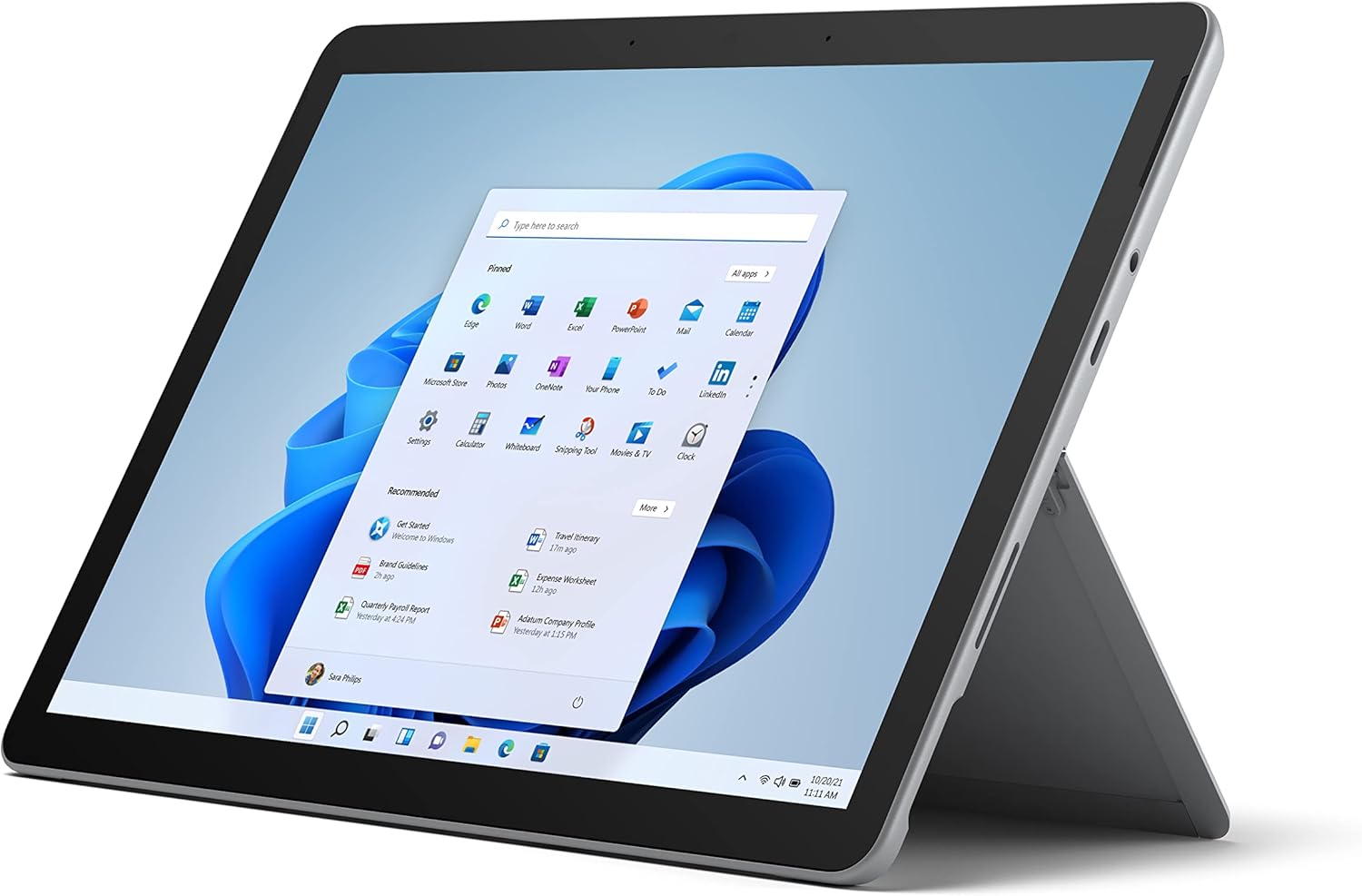
Are you in search of a Windows tablet that doesn’t compromise on features? The Microsoft Surface Go 2 remains a pick in its class. Despite being for a while this stylish and portable tablet offers all the functionalities of Windows in a sleek slate design. Moreover it boasts improved battery life compared to both its predecessor and successor models.
The design of the Surface Go 2 reflects the premium aesthetic of Microsofts Surface range featuring a silver magnesium casing and a shiny logo on the back. With dimensions of 9.7 x 6.9 x 0.3 inches and weighing 1.22 pounds (or 1.75 pounds with Type Cover attached) it is slightly smaller and heavier than an iPad. You have the option to customize your Surface Go 2 with Type Covers in Ice Blue, Poppy Red, Platinum and Black.
The tablets 10.5 inch display provides a balance of brightness and color at a resolution of 1920 x 1280 pixels. While it may not be as bright as expensive tablets like the iPad Air it still offers impressive visuals.
In terms of performance although not the quickest the Surface Go 2 handles tasks such, as web browsing and document editing effortlessly. Its battery life is noteworthy lasting over eleven hours in our tests.
With this battery you can maintain your productivity all day long without the hassle of frequent recharging. Looking for a Windows tablet packed with features? The Microsoft Surface Go 2 is an option that offers great value for your investment.
5. TECLAST T40S – Best Budget Android Tablet

Are you in search of a cost yet robust Android tablet? Well the Teclast T40S might just be what you need. Equipped with 8GB of RAM and 128GB of storage you’ll have no trouble multitasking and keeping all your apps and media files in one place.
The 10.4 inch screen is great for use but might struggle a bit under bright sunlight due to its maximum brightness of 350 nits. Despite some drawbacks like limited FM Radio support and a simplified version of Android 12 the Teclast T40S truly shines when it comes to performance and value, for money.
Whether you’re surfing the web watching videos or gaming this tablet handles it all effortlessly.. With its wallet friendly price tag you can enjoy a top notch tablet experience without burning a hole in your pocket. Why settle for less when the Teclast T40S offers both performance and affordability.
Things to Cosider Before Buying a Budget Tablet:
When looking to purchase a tablet it’s tempting to be swept away by the thrill of snagging a good deal. However before making that purchase” click pause for a moment and assess your requirements. Will your tablet mainly serve for streaming, gaming or work purposes? What features are essential, for you. What can you do without? By considering your needs you can be certain to choose a budget tablet that aligns with your hopes and avoids any potential letdowns or frustrations.
Android Tablets
Any Android tablet you choose will offer a wide range of customization options, making it easy to personalize your device to suit your needs. You’ll also have access to the Google Play Store, which offers a vast selection of apps.
Windows Tablets
Budget Windows tablets are perfect for those who want to stay productive on the go. You’ll be able to run Microsoft Office and other Windows applications, making it an excellent choice for students and professionals.
Tablets running Windows 10 offer a familiar desktop experience, allowing you to multitask and use a keyboard and mouse if needed. This makes them an excellent option for those who want to use their tablet as a laptop replacement.
iOS Tablets
The iPad is the most popular iOS tablet, offering a seamless user experience and top-notch security. You’ll have access to the App Store, which features a wide range of exclusive apps.
A significant advantage of iOS tablets is their integration with other Apple devices, making it easy to share files, photos, and music across your ecosystem.
Chrome OS Tablets
Tablets running Chrome OS are designed for web-based applications and offer a fast and lightweight experience. You’ll be able to access Google Drive, Docs, and Sheets, making it an excellent choice for students and those who primarily use web-based apps.
Tablets running Chrome OS are also highly affordable and offer long battery life, making them an excellent option for those on a tight budget.
Processor and RAM
While a fast processor is important for smooth performance, you also need to consider the amount of RAM. A minimum of 2GB of RAM is recommended, but 3GB or 4GB would be even better. This will ensure that your tablet can handle multiple tasks simultaneously without slowing down.
Storage Capacity and Expandability
Buying a tablet with adequate storage capacity is crucial. Look for a tablet with at least 32GB of internal storage, and make sure it has a microSD card slot for expandability.
Tablet storage capacity is not just about storing files and documents, but also about installing apps and games. If you plan to use your tablet for entertainment, you’ll need more storage space. Additionally, consider the type of storage used, such as eMMC or UFS, which can affect performance.
Display Size and Resolution
On the display front, consider the size and resolution that suits your needs. If you want a portable device, a 7-inch or 8-inch tablet may be ideal. For a more immersive experience, a 10-inch tablet with a high-resolution display (such as Full HD or 4K) would be a better choice.
To ensure a great viewing experience, look for a tablet with good color accuracy, brightness, and viewing angles. Also, consider the aspect ratio, which can affect how you use your tablet.
Battery Life and Charging Time
There’s nothing more frustrating than a tablet that runs out of battery quickly. Look for a tablet with a battery life of at least 8 hours, and consider the charging time as well. A fast-charging tablet can be a lifesaver when you’re on the go.
Capacity is key when it comes to battery life. A larger battery capacity doesn’t always mean longer battery life, so look for reviews and tests to get a better understanding of a tablet’s battery performance.
Connectivity Options (Wi-Fi, Bluetooth, etc.)
Display is not the only thing that matters; connectivity options are equally important. Ensure that your tablet has the latest Wi-Fi standard, Bluetooth 5.0 or higher, and other important connectivity features like USB-C or a headphone jack.
Expandability is also crucial, especially if you plan to use your tablet for work or entertainment. Look for a tablet with multiple USB ports, an HDMI output, or a microSD card slot to expand your storage capacity.
Check for Deals and Discounts
Assuming you have shortlisted your favorite tablets, it’s time to look for deals and discounts. Check online marketplaces, manufacturer websites, and retail stores for promotions or bundle deals.
Deals can significantly reduce the cost of your tablet. Keep an eye on prices and be prepared to act quickly when you find a good offer.
Make the Purchase
Compare the prices and features of your shortlisted tablets one last time. Ensure you’re buying from a reputable seller or manufacturer-authorized retailer.
Another important aspect to consider is the warranty and after-sales support. Check the manufacturer’s return and refund policies before making the final purchase.
Final Words
After taking into account the aspects to consider when choosing a budget tablet you are now ready to make a well informed decision on your purchase. Remember, it is crucial to prioritize features based on your needs and preferences. Make sure not to overlook performance display quality and storage capacity while remaining open minded, about factors. With some patience and thorough research you can discover a budget tablet that aligns with your needs and budget offering you a smooth and pleasant user experience.
Leave a Reply