
In today’s competitive gaming landscape, having the right equipment can make the difference between victory and defeat. A gaming mouse isn’t just another peripheral – it’s your primary weapon in digital battlegrounds, your precision tool in creative endeavors, and your faithful companion through countless hours of gameplay. Whether you’re a professional esports athlete, a dedicated competitive player, or someone who simply wants to enhance their gaming experience, choosing the perfect gaming mouse can significantly impact your performance and comfort. With features like adjustable DPI settings, programmable buttons, ergonomic designs, and sophisticated sensors, modern gaming mice offer capabilities that were unimaginable just a few years ago. In this guide, we’ll help you navigate through the maze of options to find the gaming mouse that perfectly matches your needs, playing style, and budget.
Contents
- Top 5 Gaming Mouse:
- 1. Razer Viper V3 Pro – Best Gaming Mouse Overall
- 2. Logitech G502 X Plus – Best RGB Gaming Mouse
- 3. Glorious O2 Wireless – Best Lightweight Gaming Mouse
- 4. Razer Naga V2 Pro – Best MMO Gaming Mouse
- 5. Logitech G305 LIGHTSPEED – Best Budget Gaming Mouse
- Things to Consider Before Buying a Gaming Mouse:
- Specialty Mice (e.g., FPS, MMO)
- Sensor Type and DPI
- Ergonomics and Grip Style
- Disadvantages and Common Drawbacks
- Personal Preferences and Playstyle
- Budget Considerations
- Cleaning and Durability
- Software and Firmware Updates
- To wrap up
Top 5 Gaming Mouse:
1. Razer Viper V3 Pro – Best Gaming Mouse Overall
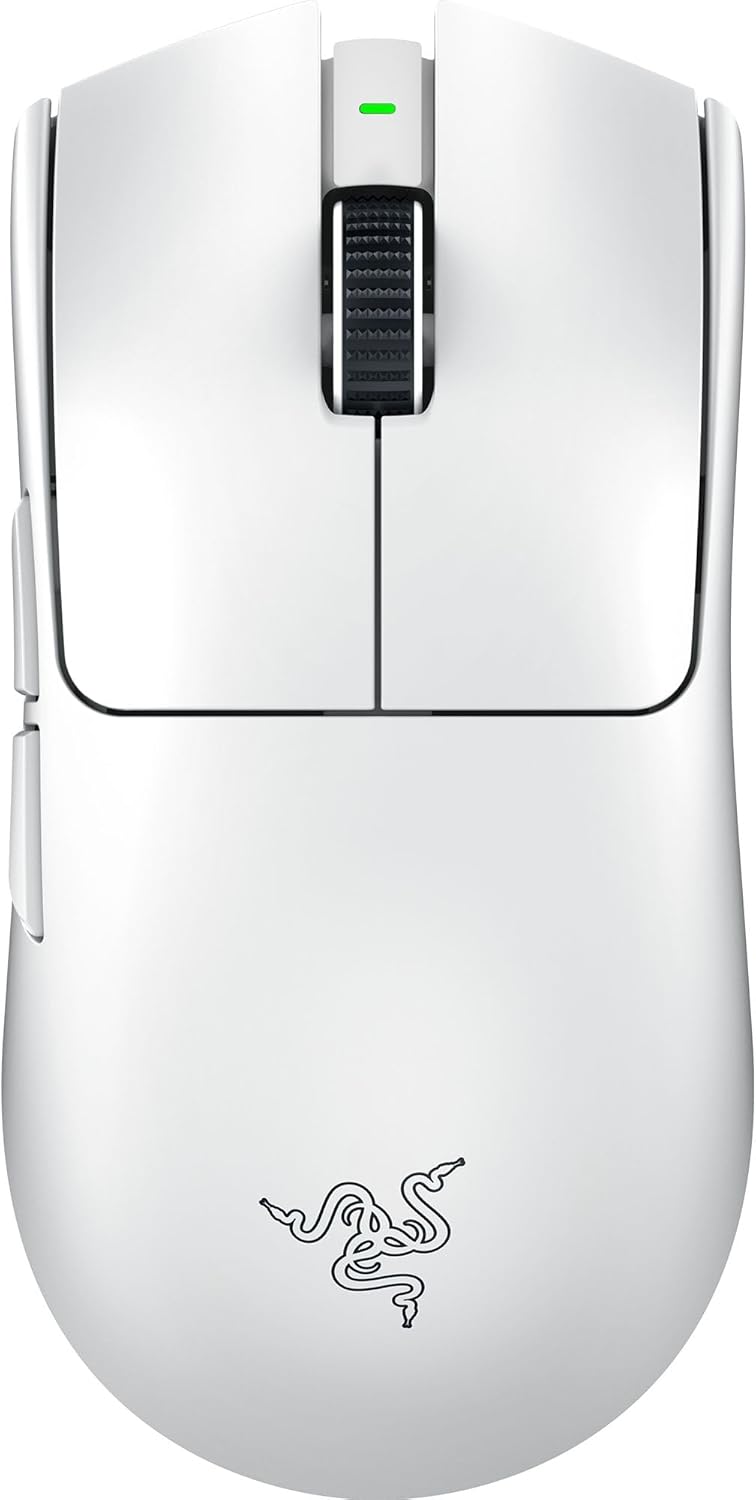
Razer Viper V3 Pro: Perfect for the avid FPS gamer, the Viper V3 Pro takes your gaming to a whole new level. With a lightweight form factor in-built and an out-of-the-box 8K HyperPolling capability, it also features an incredible 35,000 DPI. These features are game-changers if you’re a competitive gamer.
With a HyperPolling dongle, the Viper V3 Pro can deliver up to 8K polling speeds; this is becoming a standard for the best FPS gaming mice, though whether you can make the most of it will depend on your setup. Do note that the maximum polling rate over a wired connection drops to 1,000Hz, which may sound a bit disappointing. For casual players, though, that difference might not make one of them stick out—8K is mostly for the ultra-competitive.
With Razer’s state-of-the-art Focus Pro 35K optical sensor, the Viper V3 Pro is a performance monster. But given that few players regularly break 10K DPI, the higher-end options are for those who really want precision. What you gain in terms of lightweight design and performance componentry is actual, in the game-time sense, all contributing to better accuracy and response times during a gun fight. Designed specifically for FPS play, the mouse is perfectly suited to give you the upper hand and be the best in shooters.
2. Logitech G502 X Plus – Best RGB Gaming Mouse

This is your chance to level up your gameplay. Introducing the Logitech G502 X Plus, an evolution of a beloved mouse, designed to take your setup to the next level, and elevate your performance. A Hero 25K sensor is at the core of it, providing precise and unrivaled performance with a maximum DPI of 25,600 and tracking at an insane 400 IPS. Now, envision no longer needing to think about each action, moving with overall precision and enabling you to play with more bravado, hitting those key game-clinching plays.
This mouse has advanced “Lightforce” switches that feel great under the finger and provide click with tactility and pop so you’re in the zone for the ultra-fast requirements of competitive play. The G502 X Plus is customizable to match your distinct gameplay style with 13 programmable buttons with a dual-mode tilt wheel. Whether you’re playing MMOs from dawn till dusk, outsmarting opponents in MOBAs or carefully taking aim in FPS games, this peripheral will adjust to your needs.
The G502 X Plus doesn’t just focus on performance, it also features an eight-zone RGB light strip that will lend some aesthetic flair to your setup. They are great at adding color to your gaming setup and designing a desk that resonates your style.
That said, the Logitech G502 X Plus doesn’t just deliver in mouse basics — this is the kind of gear that can affect the outcome of a serious gaming session. Add it to your kit for that extra competitive edge while also showing off your personality. Ensure your next gaming adventure with the G502 X Plus!
3. Glorious O2 Wireless – Best Lightweight Gaming Mouse

Are you searching for a gaming mouse that is lightweight and comfortable to wear but also fast — and affordable? The Glorious O2 Wireless gaming mouse takes your gaming setup to the next level, both functionally and cosmetically.
Patrick Wong, GM for HP’s personal systems business in the Asia Pacific region, said: “With an advanced optical sensor and seamless Bluetooth connectivity, this mouse is perfect for every gamer demanding precision. It features a distinctive “holey” design that some might love, and others might find questionable, but it is certainly eye-catching and definitely catches the eye, especially with its customizable RGB lighting, sure to take your gaming area to the next level.
Their ability to customize, such as remappable buttons and adjustable DPI settings, makes it an ideal choice if you want to fine-tune the performance of your mouse to complement your gaming style. Additionally, you can adjust polling rates and lift-off distances to your liking, allowing you to customize the mouse to help you defeat the toughest of bosses.
Despite initial impressions suggesting a potentially front-heavy feel, the Glorious O2 Wireless seamlessly glides on any surface with its premium glide pads and BAMF 2.0 optical sensor, precision being a key focus in every motion. Its great battery life — 210 hours — means you can play longer without having to recharge often.
If you’re looking to take your gaming creatures to the next level, the Glorious O2 Wireless collection is a dependable and stylish addition to your gaming family that can take your gameplay to new heights. Invest in itself, you won’t be disappointed!
4. Razer Naga V2 Pro – Best MMO Gaming Mouse

The Razer Naga V2 Pro offers even more versatility for MMO fans. This medium-sized wireless mouse carries on the legacy of its predecessor with swappable side plates, but it adds a customisable scroll wheel. You can adjust the scroll tension, change the number of scroll steps and adjust the haptic feel to suit your gaming needs.
Yes, that’s right: you have 2.4GHz, Bluetooth, and wired via USB-C to accommodate the Naga V2 Pro to whichever gaming setup you have or laptops you might be running. Included with the mouse are three side plates that can be swapped out to achieve a configuration of 12, six, or two buttons, for a total of 20 programmable buttons including a responsive three-click scroll wheel and a profile switch on the bottom. The magnetic side plates make for fast swaps and even hide a spot for stowing the mouse’s 2.4GHz wireless dongle when not in use.
Weighing 4.72 ounces (134g), the Naga V2 Pro is comfortable and easy to use, making it a solid selection for MMO players who want to trim down their mouse setup at times. Whether you’re plunging into epic raids or exploring endless worlds, this mouse adjusts to your personal gaming style, giving you the gear you need to dominate every encounter. The Naga V2 Pro represents everything that Razer does best: Flexibility and customization.
5. Logitech G305 LIGHTSPEED – Best Budget Gaming Mouse

Symmetrical design fits a wide range of hand sizes and grip styles — from claw to fingertip grip. The G305 has a solid and premium build and is therefore a perfect companion during your gaming marathons.
Wireless connectivity on popular USB LIGHTSPEED receiver is a major aspect of G305. This allows for a tidier setup, and the battery life is fantastic — thanks to a single AA battery, it’ll last you over 250 hours, meaning you can game for days without having to remember to recharge. Its great click latency and sensor performance also makes it great for smooth and responsive gameplay.
But if you’ve got some extended gaming sessions in mind, then you may prefer something a bit lighter like the Razer Cobra. You’ll sacrifice the lack of wires, but the Cobra is lighter weight which increases agility, and that’s great for competitive gaming. Its colorful RGB lighting also gives a sleek touch to your setup.
At the end of the day, both the Logitech G305 and the Razer Cobra offer excellent value for money, so whether you want the G305 for its comfort and convenience, or the Cobra for its excellent performance and attractive design, you will really enjoy both. Visit the store to find what mouse clicks with you, and elevate your gaming experience now!
Things to Consider Before Buying a Gaming Mouse:
You are about to take your gaming experience to the next level, and the right gaming mouse can significantly impact your performance. Before making a decision, it’s important to consider factors such as ergonomics, DPI settings, button customization, and connectivity options. Each element plays a vital role in how you interact with your games, so understanding your personal gaming style and preferences is key. In this guide, you’ll find valuable insights that will help you choose the perfect gaming mouse tailored to your needs.
Specialty Mice (e.g., FPS, MMO)
Wireless mice can be customized for specific gaming styles, such as FPS or MMO. Specialty mice are engineered with features that enhance your gaming capabilities, making them a must-have for serious gamers.
Wired specialty mice, particularly for FPS and MMO games, often offer faster response times and extensive customization. FPS mice typically emphasize accuracy, featuring high DPI settings for precision targeting, while MMO mice come with programmable buttons that facilitate complex in-game actions. Having the right mouse tailored to your gaming style can greatly improve your overall gameplay experience.
Sensor Type and DPI
There’s a significant difference between the various sensor types available in gaming mice, such as optical and laser. Higher DPI (dots per inch) settings generally provide more sensitivity, allowing for more precise movements. Be sure to consider the type of games you play, as some genres benefit more from higher DPI settings than others.
Ergonomics and Grip Style
Sensor ergonomics and grip style are vital in ensuring comfort during long gaming sessions. You’ll find different grip styles such as palm, claw, and fingertip, and the shape of the mouse should accommodate your particular grip type. Choosing a mouse that fits your hand comfortably will reduce fatigue and improve your overall gaming performance.
A well-designed ergonomic mouse can significantly impact your gaming experience. It’s worth noting that many gaming mice are designed for specific grip styles, so finding one that complements your natural hand position will enhance your precision and comfort. Spend some time testing various shapes and sizes; your grip style can determine how effectively you play and how long you can endure those intense gaming sessions.
Disadvantages and Common Drawbacks
Pros of using a gaming mouse exist alongside some downsides that you should consider. While they often feature advanced functionality, these devices can come with a significant price tag, making them less accessible for casual gamers or those on a tight budget.
It is also important to note that the complexity of gaming mice can be a disadvantage for some users. The array of customizable buttons and settings may not be necessary for everyone, and those unfamiliar with gaming peripherals may find the software overwhelming. Additionally, if you decide to opt for a lightweight model, you may experience a lack of stability, which could affect your control. Balancing these factors will help you make a more informed decision.
Personal Preferences and Playstyle
Choosing the right gaming mouse is about aligning it with your playstyle and preferences. If you are a competitive player, you might prioritize accuracy and quick response times, while casual gamers may prefer comfort and aesthetic appeal. Think about the games you play most frequently; fast-paced shooters might require a different type of mouse than strategy games. Additionally, consider the size of your hand and how it feels when you grip the mouse. Finding the right fit is necessary for optimal performance.
Budget Considerations
Mouse selection also involves budget constraints. While there are many affordable options available, higher-priced mice often offer better features or durability.
Preferences in gaming gear can often lead to overspending. However, identifying a budget allows you to filter choices and find a gaming mouse that balances quality and features without breaking the bank. Look for sales or bundles that may offer good value while accommodating your gaming style. Spending wisely will ensure you enjoy a fantastic gaming experience without unnecessary financial strain.
Cleaning and Durability
To keep your gaming mouse functioning optimally, regular cleaning is vital. Dust, dirt, and debris can build up over time, affecting the sensors and overall performance. Using a soft cloth and mild cleaning solution, gently wipe the surfaces and ensure that you remove any accumulated particles, especially from the mouse feet and sensor area, which can improve its durability.
Software and Firmware Updates
Gaming mice often come with customizable software that can enhance your experience, making updates important for optimal performance.
Mouse manufacturers frequently release software and firmware updates to fix bugs, enhance features, and improve performance. By keeping your mouse’s software up to date, you can take advantage of new functionalities, bug fixes, and even better compatibility with various games. Make it a habit to check for updates periodically, as staying current can greatly enhance your gaming experience and ensure your mouse operates at its best.
To wrap up
Taking this into account, when you’re in the market for a gaming mouse, it’s vital to evaluate elements such as your grip style, the type of games you play, and the mouse’s sensor accuracy. Consider the weight and customizable features that can enhance your gaming experience. Look for durability and ergonomic design to ensure comfort during long gaming sessions. By assessing these factors, you’ll be able to choose a gaming mouse that aligns perfectly with your needs, ultimately helping to improve your performance.
Leave a Reply