
In today’s fast-paced gaming world, every second counts – whether you’re loading into a massive open-world environment or jumping into your next battle royale match. As games continue to grow in size and complexity, traditional storage solutions just aren’t cutting it anymore. Enter M.2 NVMe SSDs, the game-changing storage technology that’s revolutionizing how we experience our favorite titles. With read speeds up to seven times faster than traditional SATA SSDs, these compact powerhouses don’t just reduce loading times; they transform your entire gaming experience. If you’re tired of staring at loading screens or want to future-proof your gaming rig for upcoming titles like [latest anticipated game], you’re in the right place. We’ve tested and compared the best M.2 NVMe SSDs on the market to help you make an informed decision that’ll take your gaming setup to the next level.
Contents
- Top 5 M.2 NVMe SSDs for Gaming:
- 1. Samsung 990 Pro – Best M.2 NVMe SSD for Gaming Overall
- 2. WD Black SN850X – Best No-Fuss M.2 NVMe SSD for gaming
- 3. Crucial T500 – Best M.2 NVMe SSD for Gaming Laptops
- 4. Seagate FireCuda 530 – Best M.2 NVMe PS5 SSD for Gaming
- 5. WD Black SN770 – Best Budget M.2 NVMe SSD for Gaming
- Things to Cosider Before Buying a M.2 NVMe SSDs for GamingL:
- PCIe Generations
- Capacity and Performance
- Compatibility and Form Factor
- Advantages for Gaming
- Disadvantages and Limitations
- Brand Reputation
- Warranty and Support
- Installing the SSD
- Performance Tuning
- To Wrap Up
Top 5 M.2 NVMe SSDs for Gaming:
1. Samsung 990 Pro – Best M.2 NVMe SSD for Gaming Overall

We have the Samsung 990 Pro, a Gen 4 M.2 SSD that is among the best performers in the world, being an ideal choice for PS5 and PC gamers alike. The 980 was the more value-orientated option considering its performance per dollar, but crazy sales on the 990 Pro have changed that somewhat.
Its 2TB iteration had extremely impressive reads of 7,462MB/s and writes of 6,877MB/s means it can claim the title of one of the fastest drives around. If you’re after malevolent performance, this drive more than supports that metric. And with Gen 4 drives getting close to PCIe breaking point the 990 Pro one very much in elite territory.
But it’s important to think about its limitations. Single queue depth 4K random access performance is a little underwhelming though, at 80MB/s for reads and 231MB/s for writes. And while those numbers are respectable, they don’t necessarily improve much upon previous generations, which could be a factor if you’re looking for cutting-edge innovations.
Thermal performance is also worth mentioning; the 990 Pro’s peak operating temperature is 59 degrees Celsius, putting it well within safe operational limits during heavy workloads. All in all, the Samsung 990 Pro is a potential SDD you won’t regret buying if you need high performance.
2. WD Black SN850X – Best No-Fuss M.2 NVMe SSD for gaming

In terms of pure performance across the Gen 4 SSD space, the WD Black SN850X stands apart from the crowd, pacing its equally compelling speed to price and form factor aspects. You might think that you’d see a fairly significant change between the SN850X and the previous generation SN850 — and you’d be right — except that the improvements are very subtle, but they strike well. You’ll benefit from the increased sequential read and write speeds of the SN850X, as well as the improved cooling capabilities of its built-in heatsink. WD’s new thermal management profile does a commendable job of managing heat, which means you can push your device harder without the risk of performance throttling.
However, its 4K and random performance were negatively impacted during testing compared to the previous model. And with this slight downside aside, the SN850X is easily among the best all-rounders available, no matter your gaming and storage needs.
In fact, this is an NVME Solid State – Drive, which is used for Laptops and Drive (1000 GB Storage) | PC for all motherboard. The length is just 2.5 cm, and the black color allows it to blend seamlessly into any setup. Additionally, you have access to the WD_BLACK Dashboard, with the tools you need to monitor and manage your storage effortlessly. Whether you’re a gamer, a content creator or simply someone who values fast data access, the SN850X will enhance your experience.
3. Crucial T500 – Best M.2 NVMe SSD for Gaming Laptops

The Crucial T500 is a fantastic SSD that will upgrade your laptop. Intel’s flash storage solution is tailored towards the use of a high-performance customized controller which makes it much more power efficient and powerful without burning through battery life. With its new four-channel architecture but still the use of DRAM cache, the T500 manages to operate smoothly and quickly, even in small sizes.
If your laptop has a PCIe 3.0 slot, don’t worry: the T500 will still work great. It is all about optimizing the efficiency, letting you optimize the outputs of your laptop as much as possible. For professionals requiring a secure media solution, TCG Opal support provides an additional level of security. With its single-sided design, it also doesn’t take up additional bulk of your device.
As the heatsinked one is generally considered one of the best SSDs, the T500 is ideal for users would rather have a sleeker alternative. Indian drives, thermal management — unlike DRAM-less drives, this does a good job of managing heat and will not bring down the operation of your laptop.
Ideal for improving your laptop’s performance, the new 4TB edition of the T500 is perfect for both work and play, with plenty of space to do it all. With the Crucial T500, you’re getting a drive that’s doing its best on availability, speed and reliability—factors that truly matter for the modern user, hardware or software-wise. The Crucial T500 gives your laptop a whole new level of performance and opens up a new horizon.
4. Seagate FireCuda 530 – Best M.2 NVMe PS5 SSD for Gaming

For those who value speed and performance, however, the Seagate FireCuda 530 SSD is your best bet. Running at mind-boggling speeds of 7300MB/s — this drive will put the rising speeds of your gaming as well as resource-heavy applications to the test — enjoy lag-free performance. Using PCIe Gen4 technology, this SSD means you’re getting every bit of efficiency—this feature is a must-have in today’s high-performance demands.
The most noteworthy feature that stands out for the FireCuda 530 is the massively higher transfer rates compared to standard PCIe Gen3 M.2 NVMe drives, outperforming SATA drives by a whopping twelve times. This speed can mean quicker response times — a benefit in the heat of a gaming moment or in managing complex creative tasks — and a smoother overall flow.
Also featured is a collaborative custom low-profile heatsink developed by EKWB and Seagate. It works by minimizing thermal throttling, letting you run at peak speeds even when you’re hitting it hard.
However, although the FireCuda 530 is a beast, it’s 500 GB probably won’t store a library of games or large projects. You can easily increase your storage with more drives as you require.
Overall, the FireCuda 530 is a perfect combination of performance and thermal handling and a solid choice for your system. If so long as you’re looking to take your gaming and creative endeavors to the next level with faster loading times, the FireCuda 530 might just fit the bill!
5. WD Black SN770 – Best Budget M.2 NVMe SSD for Gaming
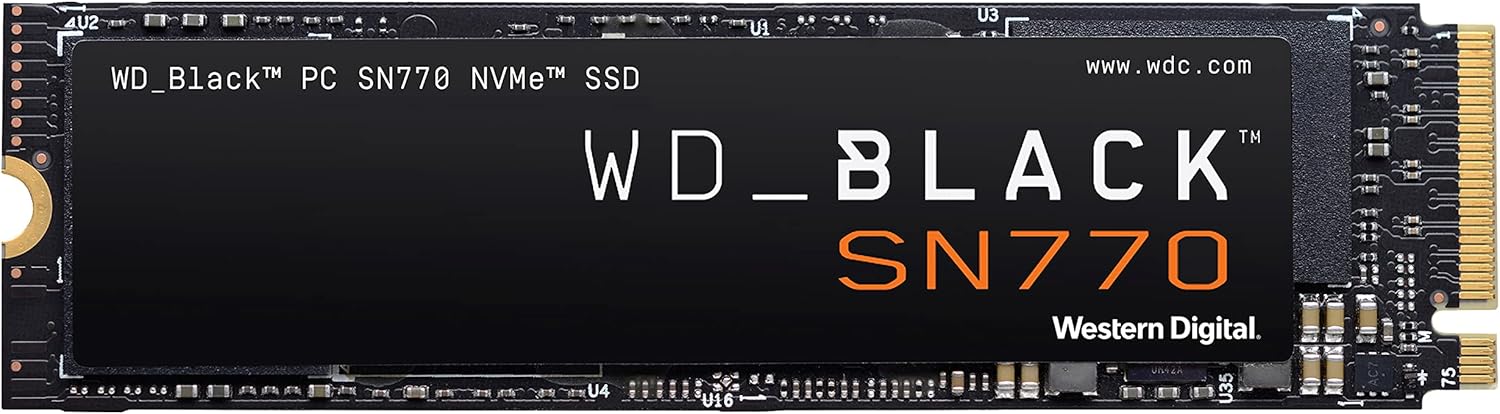
This drive is marketed towards gamers and power users, and in most aspects, it is a deserving upgrade over its predecessor. It provides outstanding sequential and random performance and it can do so at a price that should suit most budgets.
The raw performance numbers won’t exactly blow your socks off, but the SN770 does a fantastic job of getting you a Gen 4.0 SSD experience that’s fairly balanced between cost and consistency. As for our benchmarks, you’ll love the SN770’s excellent sequential speeds, reaching read and write scores of 5,227.53 MB/s and 4,980.83 MB/s in CrystalDiskMark. Its Anvil Pro score of 20,024.98, which is high for a consumer SATA SSD (usually reserved for more high-end NVMe drives), also illustrates solid performance.
If you want a storage solution that will improve your overall computing experience, such as fast OS boot times and speedy in-game loading, the WD Black SN770 should rank high on your list. With its impressive price-to-performance ratio, it’s a great match for anyone looking to upgrade. SN770 supports your gaming, all while being reliable like you would expect from the WD brand. Your Superfast SSD lets you access your favorite applications and files with lightning speed, so you’re always ready to go. WD Black SN770 is and excellent choice among the competitive storage options.
Things to Cosider Before Buying a M.2 NVMe SSDs for GamingL:
Over the years, the storage needs for gaming have evolved dramatically, making M.2 NVMe SSDs an attractive option for boosting your system’s performance. Before you make a purchase, it’s crucial to evaluate factors such as compatibility with your motherboard, read and write speeds, and capacity to ensure optimal gaming experiences. You also want to consider thermal management and durability, as these can impact performance during intense gaming sessions. This guide will help you navigate the key aspects to consider, so you can make an informed decision for your gaming rig.
PCIe Generations
The various PCIe generations significantly influence the performance capabilities of your SSD. Each generation offers advancements in speed and bandwidth, determining how efficiently data is transferred between the SSD and your system.
This evolution is vital as PCIe 3.0 provides a maximum throughput of 32 GB/s, while PCIe 4.0 doubles that to 64 GB/s, and PCIe 5.0 aims to reach 128 GB/s. Selecting a drive that utilizes the latest PCIe standard will ensure that you capitalize on the highest possible performance, making your gaming experience both faster and more fluid.
Capacity and Performance
To enhance your gaming experience, evaluate the capacity and performance of the M.2 NVMe SSD. Larger capacities will provide ample space for games, while higher read and write speeds improve load times. This can lead to a more responsive and enjoyable gameplay experience.
Compatibility and Form Factor
Clearly, before purchasing an M.2 NVMe SSD, you must check for compatibility with your motherboard and system. Not all SSDs fit the same slots or interfaces, so it’s vital to ensure your chosen option aligns with your hardware specifications.
Compatibility plays a significant role in selecting an M.2 NVMe SSD. Check if your motherboard supports PCIe Gen 3 or Gen 4, as well as the physical size of the SSD, which typically comes in 2230, 2242, 2260, or 2280 form factors. Ensuring these match will allow you to avoid potential installation issues and maximize performance.
Advantages for Gaming
An M.2 NVMe SSD significantly enhances your gaming experience by reducing load times, allowing you to jump straight into action. The faster data transfer speeds mean games can perform better, minimizing stuttering and ensuring smoother gameplay. Additionally, with the ability to handle multitasking efficiently, you can run background applications without a hiccup, making it the ideal choice for dedicated gamers.
Disadvantages and Limitations
If you’re leaning towards an M.2 NVMe SSD, be aware of some potential drawbacks. The initial investment is usually higher than traditional SATA SSDs, which might impact your budget if you’re looking to upgrade multiple components. Moreover, these SSDs may encounter thermal issues if not properly cooled, which could impact performance during prolonged gaming sessions.
A key limitation to consider is the compatibility aspect. Not all motherboards support M.2 NVMe drives, particularly older models, so confirming your motherboard’s specifications is imperative. Additionally, while M.2 NVMe drives excel at speed, their higher power consumption and heat output may also be a concern for some builds. Balancing these factors will help you decide if an M.2 NVMe SSD fits your gaming needs.
Brand Reputation
Reputation matters when selecting an SSD, as established brands often provide more reliable products. Look for manufacturers known for high performance and durability. Checking customer reviews and expert recommendations can guide you toward trustworthy brands, ensuring your investment is sound. You may find that reputable brands often rank higher in performance benchmarks, which can enhance your gaming experience.
Warranty and Support
One of the most significant aspects to consider is the warranty and support offered by the manufacturer. A longer warranty typically indicates confidence in the product’s reliability and can save you money in the long run.
Brand warranty policies can range from a few years to a lifetime, so it’s wise to choose one that offers comprehensive support. This not only protects your investment but also provides peace of mind, knowing that you have assistance should you encounter any issues. A strong customer support team is invaluable, particularly if you need help with installation or troubleshooting later on.
Installing the SSD
One of the critical steps is installing the SSD itself. After you’ve prepared your system, carefully handle the SSD to avoid any physical damage. Align the gold connectors of the M.2 NVMe SSD with the slot on your motherboard. Insert the SSD at a slight angle, usually around 30 degrees, and then gently push it down into place before securing it with the provided screw. Make sure it is firmly fixed, as any loose connections can lead to performance issues.
With a secure connection, you can now close your computer case and reconnect all cables. Afterward, power on your system and enter the BIOS setup to confirm that the M.2 NVMe SSD is recognized. If everything looks good, you’re ready to format the SSD and start enjoying the significant performance boost it provides for your gaming experience.
Performance Tuning
You can also enhance your M.2 NVMe SSD’s performance through various tuning techniques. This may include adjusting power settings, disabling unused features, or enabling specific settings in your system BIOS to maximize speed.
For instance, tweaking your operating system settings can further refine performance. Things like disabling write caching or enabling TRIM can help maintain the drive’s speed over time. Additionally, utilizing software utilities from your SSD manufacturer can provide further insights into optimization options tailored specifically to your device, enhancing both efficiency and longevity.
To Wrap Up
The decision to purchase an M.2 NVMe SSD for gaming should be informed by key factors such as compatibility with your motherboard, storage capacity for your gaming libraries, read and write speeds for smooth performance, and cooling solutions to manage heat. You should also consider price and warranty options to ensure a worthwhile investment. By evaluating these considerations, you can select a drive that enhances your gaming experience and meets your needs effectively.
Leave a Reply