
Finding the best computer speakers shouldn’t be hard, yet many people settle for weak, tinny sound. You deserve a breathtaking setup that makes every movie and song feel electrifying. Better desktop audio gives you crisp sound quality for your workspace. We tested the top models to help you find the perfect match for your budget. Here are the best picks to upgrade your desk today.
Contents
- Top 5 Computer Speakers:
- 1. Logitech Z407 – Best Computer Speakers Overall
- 2. Audioengine A5+ Wireless – Best Computer Speakers for Audiophiles
- 3. Edifier R1280DB – Best Bookshelf Computer Speakers
- 4. PreSonus Eris E3.5 – Best Studio-Style Computer Speakers
- 5. Creative Pebble 2.0 – Best Budget Computer Speakers
- Things to Consider Before Buying a Computer Speaker:
- Stereo, 2.1 and multi‑driver systems – how they differ
- Wired, Bluetooth and USB models – pros and use cases
- Sound quality metrics: frequency response, clarity, bass
- Power, size, build quality, connectivity and budget
- Desktop/compact vs. bookshelf vs. soundbar – advantages and tradeoffs
- Wired vs. wireless – reliability, latency and convenience tradeoffs
- Longevity: placement, care, firmware and upgrade paths
- Ideal placement, acoustic tweaks and subwoofer integration
- Connectivity, drivers, DSP features and multi‑device use
- To wrap up
Top 5 Computer Speakers:
1. Logitech Z407 – Best Computer Speakers Overall
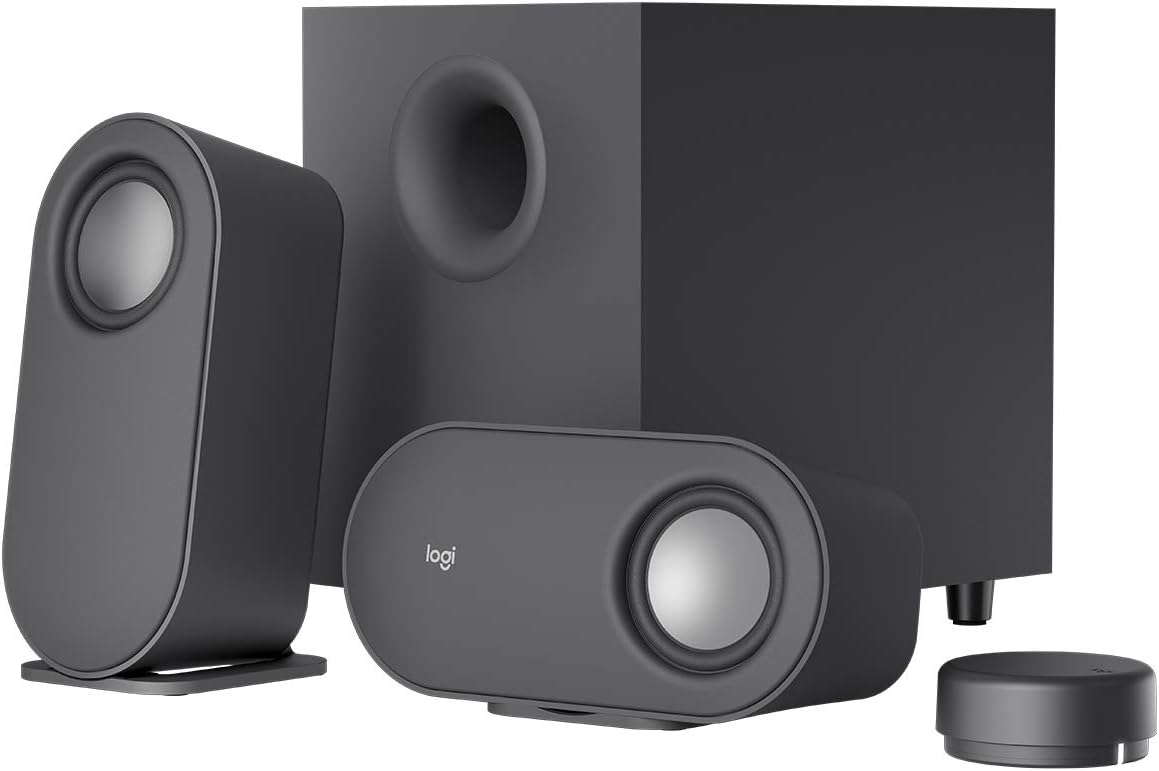
The Logitech Z407 is an excellent choice if you want a versatile computer speaker system that enhances the sound of all your media files, including games, movies, phone calls, and music. With 80W peak power and a professionally tuned stereo configuration, your music will ring out with crisp highs, rich mids, and a solid bass presence—all without coming across as thin or distorted.
The Z407 truly shines in terms of bass for regular listening. Digital signal processing improves the 20-watt bass output by preserving deep, clear low frequencies. All the while, the language and vocals remain easily understandable, the soundtracks hit harder, the movie scenes feel more vibrant, and the gaming effects carry more punch.
The control is incredibly user-friendly and incredibly handy. From across the room, you can adjust the bass and volume with the wireless control dial. Perfect for those times when you don’t want to take your hands off your work to grab your computer—just tap to play or pause, and spin to adjust the volume.
Depending on your setup, the satellite speakers can also be adjusted. Place them vertically or horizontally according to your space and style; their sleek oval design in graphite-gray looks clean on a desk.
Just as adaptable is connectivity. The 3.5mm input, Bluetooth, and micro USB support up to three devices at once, and there are dedicated keys for switching between wired and wireless sources, making the transition from PC to phone a breeze.
2. Audioengine A5+ Wireless – Best Computer Speakers for Audiophiles

The Audioengine A5+ Wireless is designed for those who value hearing music in its original, unadulterated form, with all the details and details heard. Desktop speaker systems designed with audiophiles in mind don’t merely ramp up the volume; they also get the details right, allowing you to make out layered vocals, instruments, and ambient noises that might otherwise go unnoticed by less powerful speakers.
Featuring 5-inch Kevlar woofers for precise bass and midrange and 0.75-inch silk dome tweeters for effortless highs, these custom-built speakers are a cut above the rest. If you’re listening to acoustic music, electronic dance music, movie scores, or games with extensive sound design, you’ll enjoy full-bodied sound with clarity at both ends thanks to their combined wide frequency range of 50Hz to 22kHz.
One major perk is the built-in, high-performance D/A converter. In contrast to using your computer’s integrated sound card, which can introduce noise and diminish detail, the A5+ handles digital audio with superior fidelity. Whether you’re streaming high-quality audio or using lossless files, the result will be cleaner output, improved instrument separation, and a more “alive” presentation.
You have plenty of headroom and power available up to 150 watts, so the sound remains composed and dynamic even at high volumes. You don’t need any additional equipment to enjoy high-quality, studio-style listening from the comfort of your desk with this configuration.
3. Edifier R1280DB – Best Bookshelf Computer Speakers
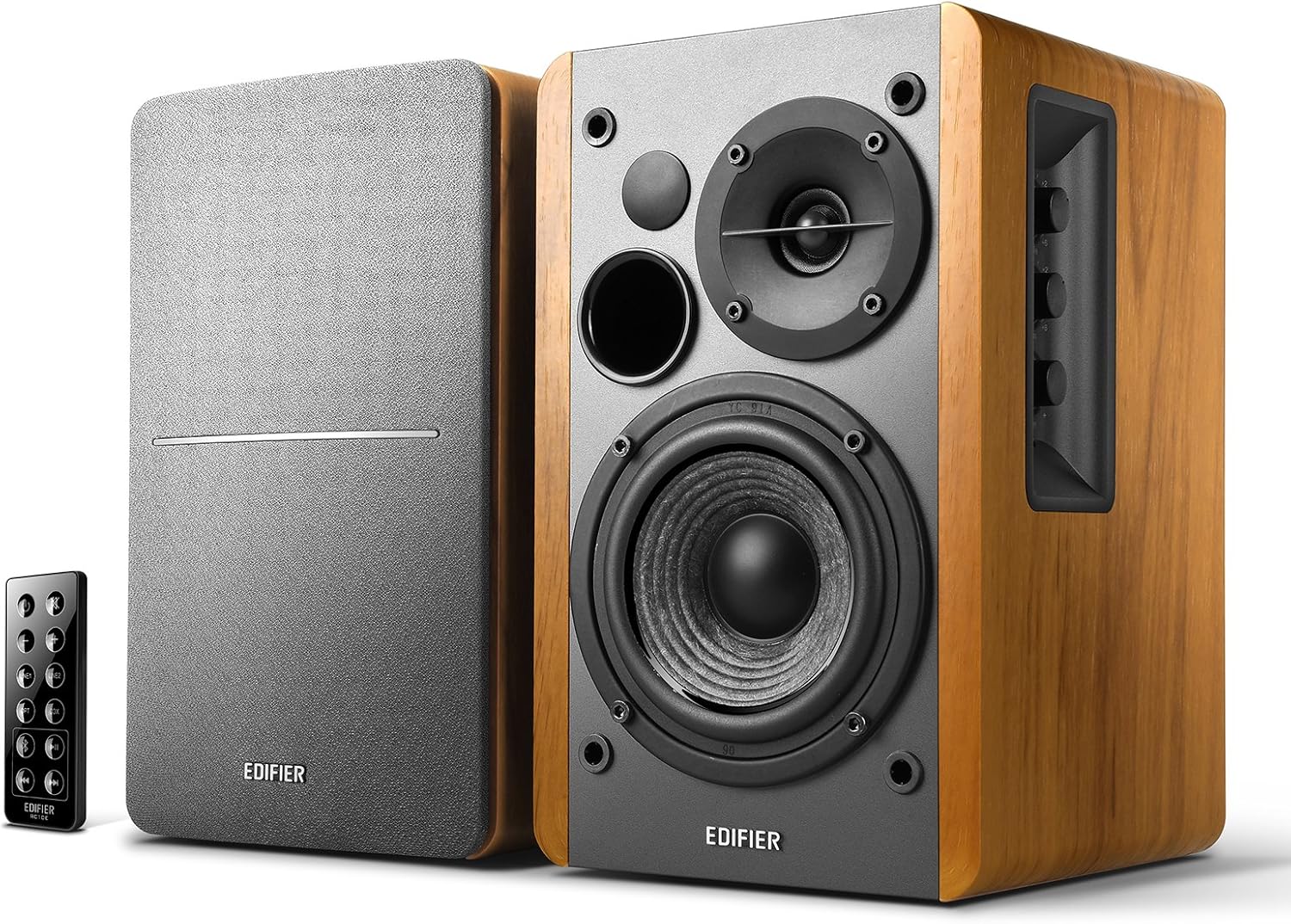
A trustworthy bookshelf speaker upgrade, the Edifier R1280DB produces warm, room-filling sound that is equally at home on a desk or in front of a television. Its 42 watts of power and traditional wood finish make it more powerful than ordinary computer speakers while maintaining crystal-clear audio for voices and conversations.
Bluetooth simplifies everyday use. It only takes a few seconds to go from your work playlist to your favorite movie or game because you can stream wirelessly from your phone, tablet, or laptop. If you’re sick of hiss, low volume, or inconsistent music from standard outputs, the optical and coaxial inputs allow you to establish a digital, near-lossless link to numerous PCs and TVs, providing the cleanest connection possible.
A 4-inch bass driver provides strong low- and middle presence, while a 13 mm silk-dome tweeter produces highs that are neither harsh nor tiring, creating a balanced two-way design in terms of sound. With this adjustment, you’ll have a more immersive experience across the board, be it music, YouTube, or games with positional audio.
Handling is easy and hassle-free. Instead of always reaching behind your speakers, you can use the supplied remote to change the inputs or control the volume. In addition, the side panel knobs provide direct control over the bass and treble, allowing you to fine-tune the sound to suit your room, your material, and your personal taste.
4. PreSonus Eris E3.5 – Best Studio-Style Computer Speakers

The PreSonus Eris E3.5 is an excellent upgrade from regular computer speakers if you’re looking for studio-quality sound without breaking the bank on bulky monitors. Ideal for general listening, gaming, movies, and even amateur music production when you wish your tracks sounded more true to the original recording, it’s designed to provide a more balanced and realistic presentation.
Despite their small size, the 3.5-inch woven composite drivers provide a deeper bass response than most portable speakers, and they maintain a crisp midrange that makes it easy to hear every nuance of music. The top-mounted, 1-inch ultra-low-mass silk-dome tweeters mitigate harsh treble, allowing for detailed, yet not overly harsh or tiresome, sound from cymbals, strings, and gaming effects.
The E3.5’s acoustic tuning is one of its distinguishing features in this category. If your speakers are against a wall, in a corner, or even just resting on a tiny desk, where reflections can alter the sound, room-tuning controls will allow you to modify the volume and EQ to suit your surroundings.
Plus, it has built-in convenience. A stereo auxiliary port and Bluetooth make it easy to connect your phone or tablet for wireless streaming. You can make quick adjustments without bending over your setup thanks to the front panel’s volume control, power switch, and headphone jack for private listening.
5. Creative Pebble 2.0 – Best Budget Computer Speakers
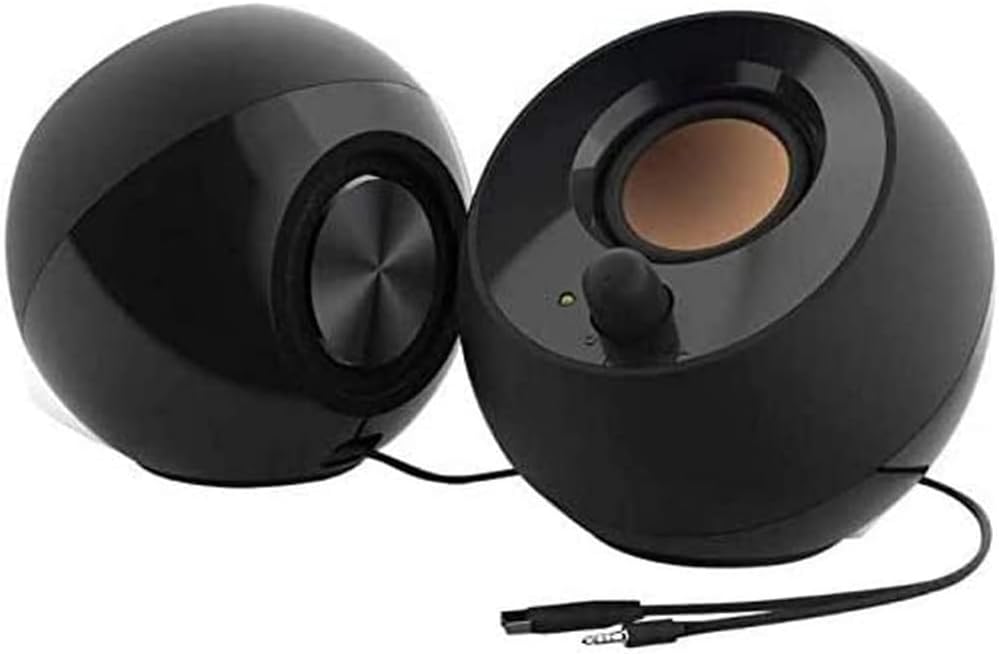
If you’re looking for an affordable and quick update to improve the sound quality of your laptop or desktop, the Creative Pebble 2.0 is a versatile option that will work with nearly any setup. Built-in speakers tend to sound thin and muted, so it’s made for everyday listening like online classes, video calls, music, and casual streaming.
The setup process is quite simple. You won’t need an additional wall outlet or power adapter because a single USB cable provides both power and audio. Because of this, the Pebble 2.0 is an excellent choice if you frequently switch between different rooms or desks, as it keeps your workspace organized.
The sound is calibrated to travel, despite its diminutive size. Even when you’re not directly in front of the speakers, the far-field drivers will let you hear voices and details more clearly since they radiate the sound. With the low end supported by rear-facing passive radiators, you get a richer bass response than with inexpensive speakers, which is great for movies, music, and game sound effects without drowning out the voice.
Audio is pushed closer to your ears by the 45° increased driver angle, which makes listening more comfortable and enhances clarity, even during extended sessions. Also, the front-facing volume control is conveniently located where your hand naturally lands, so you won’t have to fiddle with the settings or reach behind the speakers to make quick adjustments.
The sleek, contemporary design of the Pebble 2.0 makes it easy to incorporate into home study, bedroom, or workplace decor while providing significantly enhanced sound with minimal adjustment.
Things to Consider Before Buying a Computer Speaker:
This guide helps you assess sound quality, power, connectivity, size, compatibility, and budget so you can pick computer speakers that match your listening needs and setup.
Stereo, 2.1 and multi‑driver systems – how they differ
Stereo gives focused left-right imaging for music, 2.1 adds a sub for fuller bass without much extra space, and multi‑driver systems expand channels for immersive surround effects when you want cinematic or gaming depth.
Wired, Bluetooth and USB models – pros and use cases
Wired minimizes latency for pro use, Bluetooth offers wireless freedom for mobile pairing, and USB delivers a clean digital feed and often powers the speakers for simple PC setups.
Additionally, you should weigh latency, codec support, power and convenience: wired (3.5mm, RCA) is universal with lowest delay; USB gives a digital signal and built-in DACs that can improve clarity and volume control; Bluetooth suits casual, mobile use but depends on codec quality and range, and may require aptX/LDAC for better fidelity.
Sound quality metrics: frequency response, clarity, bass
Compare frequency response specs and listening tests to assess clarity; prioritize midrange for vocals and treble for detail, while checking bass extension and control. You should audition speakers with familiar tracks to judge real-world performance.
Power, size, build quality, connectivity and budget
Balance amplifier power with room dimensions and intended volume; inspect cabinet build and driver quality for durability and tonal accuracy. Evaluate connectivity options-wired, Bluetooth, optical-and align features with your budget.
Additionally, match amplifier RMS power to your speaker sensitivity and room size-higher sensitivity needs less power and you should leave headroom to prevent clipping. If you choose active speakers, verify their built-in amps and DSP. Consider enclosure type (sealed for tight bass, ported for more extension), materials and driver dimensions versus placement limits; prefer wired links for low latency and prioritize sound quality within your budget, checking warranty and return terms.
Desktop/compact vs. bookshelf vs. soundbar – advantages and tradeoffs
Compare small desktop speakers for near-field clarity and convenience, bookshelf models for fuller midrange and upgrade paths with a sub, and soundbars for TV-focused, space-saving solutions; you trade off stereo width, bass authority and placement flexibility depending on your priorities.
Wired vs. wireless – reliability, latency and convenience tradeoffs
Choose wired for consistent connection, the lowest latency and uncompressed fidelity; choose wireless for placement freedom and ease of use, accepting possible compression, higher latency and occasional interference based on protocol and environment.
Furthermore, you should weigh specific interfaces and codecs: wired options (3.5mm, USB, optical, HDMI/eARC) give predictable performance and sub-5ms latency ideal for gaming or precise monitoring. Bluetooth varies by codec-SBC and AAC can compress more, aptX/aptX LL and LDAC offer higher quality or lower latency (aptX LL ≈40ms). Wi‑Fi-based streams (AirPlay, Chromecast) support higher bitrate and multiroom but depend on network stability. Wireless speakers also face battery limits and RF congestion; pick wired for critical listening or low-latency needs and wireless for casual streaming and flexible placement.
Longevity: placement, care, firmware and upgrade paths
Place speakers on stable stands away from direct sunlight and dampness, and you should dust grilles gently, avoid harsh cleaners, and apply firmware updates from the manufacturer when available.
Maintain periodic checks on mounts, isolation, and room changes so you prevent rattles and uneven wear; you should back up presets before updates, source firmware only from the vendor, and prefer systems with modular or external upgrade options. Perceiving gradual shifts in timbre and response helps you decide when servicing or upgrading is warranted.
Ideal placement, acoustic tweaks and subwoofer integration
Experiment with speaker angle and distance: place tweeters at ear level, leave space for bass, and set subwoofer crossover and phase so the sub blends without boominess.
Connectivity, drivers, DSP features and multi‑device use
Verify connection options and driver support: you should ensure Bluetooth codecs, USB class compliance, and available DSP presets match your use, and confirm easy switching between devices.
When choosing, you should weigh codec support (aptX/aptX HD, LDAC, AAC) for both quality and latency, prefer class‑compliant USB or plug‑and‑play drivers on Windows/Mac to avoid extra installs, and check for companion apps, firmware updates, DSP EQ and room‑correction; use low‑latency modes or wired/optical connections for gaming and reliable multipoint or wired switching for multiple devices.
To wrap up
Considering all points you should assess sound quality, size and placement, connectivity options (wired, Bluetooth, USB), power and impedance, budget, room acoustics, and compatibility with your computer and software; test speakers if possible and prioritize clarity and build quality to ensure long-term satisfaction.
Leave a Reply