
Searching for the best Micro-ATX cases is the key to building a powerful PC that won’t dominate your desk space. It’s incredibly frustrating to want a compact build but worry about sacrificing crucial airflow or performance. We’ve eliminated the guesswork for you, finding the ultimate options that blend style and function perfectly. Let’s dive into the top-tier chassis that will become the foundation for your dream rig, ensuring both cool temps and a clean aesthetic.
Contents
- Top 5 Micro-ATX Cases:
- 1. ASUS Prime AP201 – Best Micro-ATX Case Overall
- 2. Lian Li LANCOOL 205M Mesh – Best Micro-ATX Case for Easy-Build
- 3. Fractal Design Pop Mini Air – Best RGB Air-flow Micro-ATX Case
- 4. Lian Li A3 mATX – Best High-End Compact Micro-ATX Case
- 5. Cooler Master MasterBox Q300L – Best Budget Micro-ATX Case
- Things to Consider Before Buying a Micro-ATX Case:
- Unpacking the Dimensions: Do Size Matters
- Essential Micro-ATX Case Measurements
- Compatibility with Components
- The Aesthetic Factor: Style Meets Functionality
- Design Trends in Micro-ATX Cases
- Personalizing Your Build: RGB, Materials, and Finishes
- Cooling Considerations: Keeping Your System Chill
- Airflow Designs: Optimal Ventilation Strategies
- Front I/O Panel Essentials
- Expansion Slots and Their Importance
- Future-Proofing Your Investment
- Conclusion
Top 5 Micro-ATX Cases:
1. ASUS Prime AP201 – Best Micro-ATX Case Overall

The ASUS Prime AP201 is an impressive micro-ATX chassis and it’s the perfect case for your build projects, be that gaming or business. A great choice for those wanting the smallest possible system, with the smallest possible motherboard.
Looking for maximum airflow in your setup? The AP201 includes quasi-filter mesh that is made out of precision-cut holes and a unique structure to provide an extraordinary level of airflow cooling, giving prominence to the components that you want to include in your build. The ability of housing both 280mm and 360mm radiators, and space for up to six fans provides for extensive cooling solutions and support for the most powerful of GPUs.
The ASUS Prime AP201 is all about easy access. Tool free side panels are held in place with easy to use clamps and can be removed without the need for screws to easily access your components. This also makes upgrading easy, and the panels won’t fall off.
Cable management is another area in which the AP201 really shines. Featuring a longer motherboard tray, you will find well-placed cut out holes allowing for easy routeing of your cables, 32mm of cable management space behind the motherboard and rubber grommets set into the motherboard tray. This smart design make the computer system have clean look and good air flow.
When it comes to performance, it is a little more exciting; Not only is the case great for those who wish to pack the case with fans, everything built inside the case runs at peak performance, this is down to the way in which the case has been designed.
2. Lian Li LANCOOL 205M Mesh – Best Micro-ATX Case for Easy-Build

The Lian Li LANCOOL 205M Mesh is an intuitive option for users who desire everything (that you expect from a case) be it in a compact micro-ATX footprint or built as a full ATX. Seeking a gaming mid-tower that is customizable, yet adapted for a variety of configurations? It supports Micro ATX and Mini-ITX motherboards for flexibility when building.
You will also love the front panel made from mesh; in addition to keeping dust out with magnetic dust filters on the top and bottom, the mesh allows optimal airflow in a compact case. This case has you covered whether you’re into air or liquid cooling. Featuring dual pre installed 140 millimeter addressable rgb LED lighting fans in the front, you can experience Vibrant lighting effects that can be controlled through motherboard software.
LANCOOL 205M is tempered glass which can show the appealing light of the front panel of the case, adding more ARGB perspective to the product. Our removable SSD bracket not only allows you to mount an SSD on the back, but also supports a massive 240mm radiator, double 120mm cooler or double 140mm cooler. Don’t Hesitate to add multiple fans because there is still plenty of room left to cool down your hardware. With our drive bay design, you are free to change the location as you wish! A big 120mm fan makes no compromise, it might be terribly small but it is Jonsbo cool! Our brushed aluminium front panel with simple branding, and it looks stunning. With extreme cooling both air and water, the ultra-tidy interior is free of obstruction and easy to maintain. Renew the interior within 10 seconds, your system can never be this easier to create. A magic key to adjust your LED status in no time. You could almost lock your window with our cylindrical support system!
Made of sturdy alloy steel, this mid-tower chassis offers longevity, and the host of space for components. More than just a case, the Lian Li LANCOOL 205M Mesh is the foundation for your dream gaming PC. Get one less thing to worry about and get your style on point with your next build.
3. Fractal Design Pop Mini Air – Best RGB Air-flow Micro-ATX Case

Fractal Design Pop Mini Air is a great little micro-ATX case for enthusiasts who want good airflow and style. In search of a case in the mATX-Mini ITX size that has the strength to contain all high-end components you need? This case is an ideal choice. An open side panel, vented and angled for an easy access to the system, giving you a simple way to display your build; The darkened tempered glass side panel showcases your components and provides high contrast and the for an impressive look.
You will love the ample storage options; you can install up to two HDDs and six SSDs (or one HDD with five SSDs) — or if you prefer to focus more on your gaming rig, you are able to replace the 5.25″ optical bays for up to five SSDs. This versatility provides you and your game with space to breathe, allow for ample room for your well-organized file and game data.
The Pop Mini Air is installed with three 120mm Aspect RGB cooling fans to maximize both the thermal performance and the RGB lightning effects. And then you can add some more cooling with support for two more fans, making a total of five for the most effective airflow.
MOTHERBOARD SUPPORT ATX, MICRO-ATX, MINI-ITX If you’re building with water cooling in mind, this case supports radiators up to 240 mm on both the front and the top, and the rear supports a 120 mm radiator, so you can leverage all the cooling capability you need. The Pop Mini Air combines function and design with a sleek RGB Black TG Clear Tint design, integrated 5.25” hidden bays with storage drawer and magnetic cover. Take your game to the next level with a case that is ideal in performance and style.
4. Lian Li A3 mATX – Best High-End Compact Micro-ATX Case

Looking for a compact and high-end micro-ATX case that’s styled like a supercar? The A3 mATX mini-tower from Lian Li is a case for the gamers out there with a minimalistic, clean look that will fit right at home in any desk or room. Despite having a 26.3 liter volume size, the PC-O9 has managed to install not only the latest storage devices, a superior hardware system, but also liquid cooling.
The Lian Li A3 can support both micro ATX and ITX motherboards, so it is suitable for a wide range of builds. Whether you’re a gamer or a content creator, prepare for stunning graphics requiring people to ask what card do you have – up to 415mm long, the ABKONCORE is ideal for high-performance sexy builds. Cool looking as well the side and top of the case are a darkened tempered glass, and they designed the rest of the body with steel mesh to help with heat and airflow to make sure no RGB gets overheated during long gaming sessions!
If you were looking to maximize your cooling potential then don’t worry, this case can fit up to 360mm radiators and up to 10 x 120mm fans. This helps your system to stay at peak performance and also helps to prevent your hardware from becoming obsolete.
Built to LastMade of sturdy plated steel, the Lian Li A3 makes a solid and beautiful home for your hardware. Featuring bottom placed PSU design with dust filter, the T60-002 makes cable management a snap. Enhance your gaming experience with a quality and modern style case that can take all the heat you want to give, leaving you to take care of your in-game performance.
5. Cooler Master MasterBox Q300L – Best Budget Micro-ATX Case
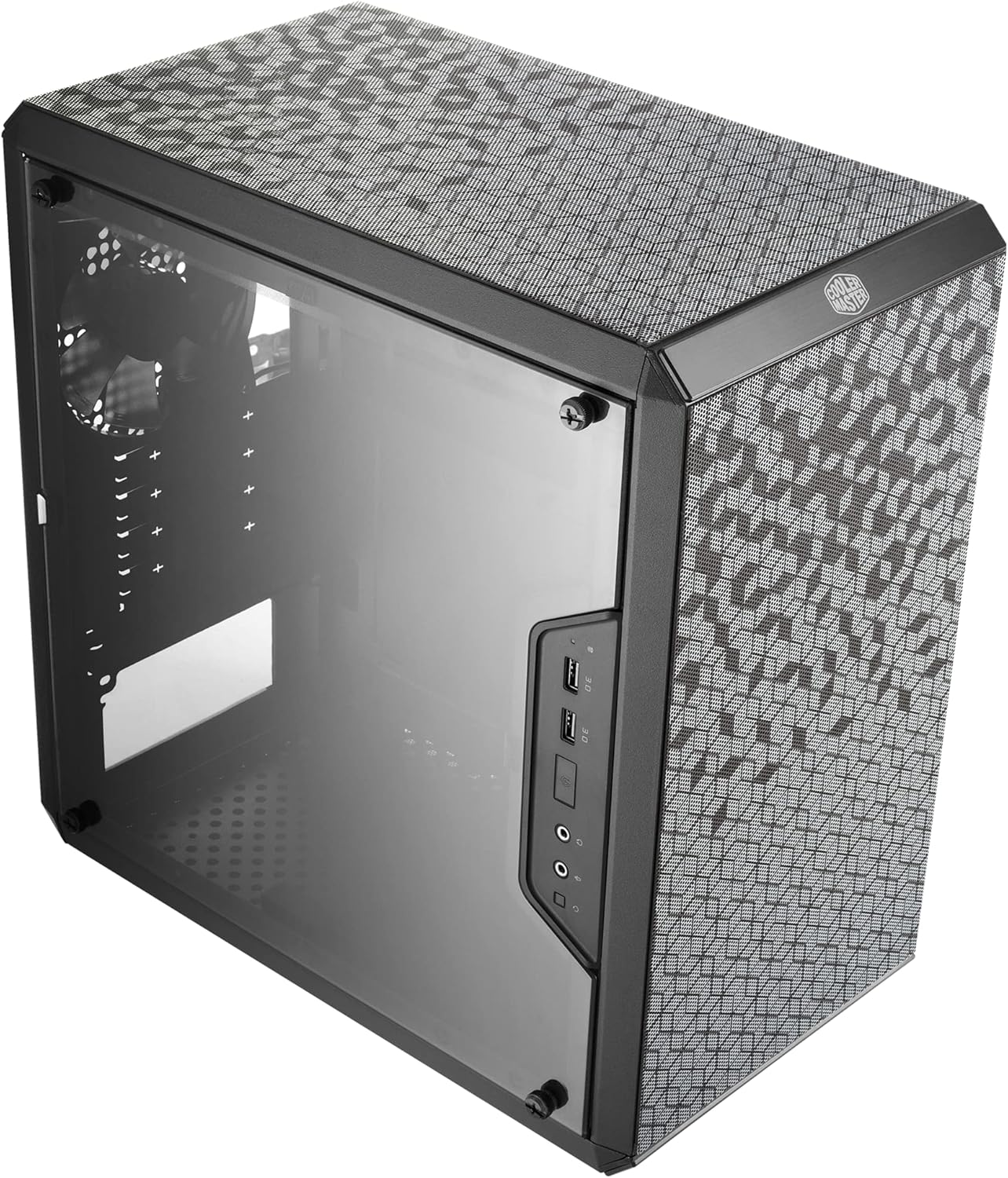
Is looking for a budget micro-atx case that isn’t garbage? Well, the Cooler Master MasterBox Q300L might just be the right one for you. Constructed by all-alloy steel, more durable, making you never need to buy another computer case again to keep up with the hot trends.
It’s very lightweight for the size coming in at right around 480 grams but still offers good space for a larger Micro-ATX motherboard or a Mini-ITX model. Featuring ample room and options for system 43 components and storage, it gives you 159mm CPU cooler clearance 43, 360mm GPU clearance, and 160mm PSU length. That leaves some room for future proofing and flexibility with picks.
Cooling is important for a gaming cabinet and Q300L features a cooling design that includes an open air thermal design, providing hot air that flows out the top panel, offering a perforated pattern for good airflow. You also have the ability to increase cooling further with a 240mm liquid cooler and 5 fans. The modular I/O panel can be adjusted to be located in the front, top or bottom to fit your configuration.
The Q300L allows user to display and admire all your components through the full size transparent side panel. And oh yeah, let’s not forget about the magnetic dust filters which not only keep your system clean, but also give an aggressive and cool appearance to your case. For great functionality, good looks, and a sophisticated case that improves your gaming experience, the Cooler Master MasterBox Q300L is a sound purchase.
Things to Consider Before Buying a Micro-ATX Case:
MicroATX cases balance size and expandability, so you should evaluate motherboard compatibility, GPU clearance, cooling options, drive bays, and front I/O to ensure your components fit and stay cool; consider cable management, PSU form factor, noise levels, and future upgrades to make a case that suits your build and workflow.
Unpacking the Dimensions: Do Size Matters
Micro-ATX uses a 244 x 244 mm motherboard footprint, but case dimensions dictate the real build constraints: internal clearance for GPU length, CPU cooler height, PSU depth, and radiator placement determine what hardware you can fit. You should compare the case’s listed maximum GPU length (often 280–330 mm), cooler clearance (typically 155–175 mm), and PSU depth (140–180 mm) against your components before buying.
Essential Micro-ATX Case Measurements
Check maximum GPU length, CPU cooler height, and available radiator mounting locations: many mATX cases list GPU clearance between 280–330 mm, cooler height 155–175 mm, and support for 120 mm or 240 mm front/top radiators. Note drive cage positions and motherboard standoff placement too, since a relocated cage can add several centimeters of GPU clearance or force you to use 2.5″ drives only.
Compatibility with Components
Micro-ATX boards generally provide four expansion slots and up to four SATA ports plus one or two M.2 slots, so you need to confirm the case supports full-length GPUs, the height of RAM under large air coolers, and whether the case accepts ATX or SFX PSUs. Verify radiator mounting (120/240 mm) and cable routing channels to avoid fitment surprises.
Measure your GPU including any backplate or angled power connectors, since stated GPU length often omits connector overhang; allow 10–20 mm extra for cable bend. Confirm CPU cooler height against the case spec and RAM module heights (tall RAM can conflict with 160+ mm coolers). For AIOs, check bracket locations—some mATX cases only accept 240 mm at the front, not the top—and verify PSU depth plus rear cable clearance.
The Aesthetic Factor: Style Meets Functionality
You’ll weigh tempered glass versus mesh: glass showcases components and RGB while mesh prioritizes airflow for high-TDP builds. Many micro-ATX cases still accommodate 240mm AIOs and GPUs up to ~330mm, so visual choices affect cooling and clearance. Solid steel or aluminum fronts favor noise damping; clear panels demand cleaner cable runs, so plan cable management and component layout to keep the look tidy without sacrificing thermal performance.
Design Trends in Micro-ATX Cases
Minimalist front panels, full-width tempered glass, and high-airflow mesh are dominating releases, with many manufacturers adding vertical GPU brackets and modular drive cages. Expect support for two to four 120mm fans, front 240mm radiators, and shallow depths around 350–420mm in compact models. Examples like Fractal’s Meshify C Mini and Phanteks Evolv mATX illustrate the mesh-versus-aluminum trade-off between cooling and premium finishes.
Personalizing Your Build: RGB, Materials, and Finishes
RGB options range from simple LED strips to addressable 3-pin ARGB setups that sync with your motherboard; check for a 5V ARGB header or an included controller. Steel cases cost less but add weight, while aluminum and brushed finishes raise prices and durability. Tempered glass panels (typically 3–5mm) showcase your layout but can amplify noise, so balance flashy lighting with airflow and acoustic choices.
Verify motherboard headers: 3-pin 5V ARGB and 4-pin 12V RGB are incompatible without a converter, and many ARGB headers supply around 3A (15W) total—so heavy LED builds often need an external controller or hub. Use magnetic or adhesive RGB strips placed behind tempered glass for even diffusion, and choose fan hubs or PWM controllers to centralize power and keep cables hidden while maintaining intake/exhaust balance for cooling.
Cooling Considerations: Keeping Your System Chill
Assess how many fan mounts, radiator locations, and ventilation cutouts your micro-ATX case offers because that determines sustained thermals under load; a typical 2x120mm front + 1x120mm rear config handles a midrange CPU/GPU combo, while higher-TDP builds need 240mm radiators or additional intake/exhaust to keep temps stable and noise down.
Airflow Designs: Optimal Ventilation Strategies
Place intake fans at the front and bottom and exhaust at the rear and top to create a front-to-back airflow path; aim for slight positive pressure with one more intake fan or higher CFM intake fans to reduce dust, use 120mm or 140mm fans depending on mount availability, and route cables along the tray to avoid disrupting the GPU’s airflow channel.
Front I/O Panel Essentials
You should check for at least two USB-A 3.0 ports (5 Gbps), a USB-C 3.2 Gen 2 port (10 Gbps) for fast external SSDs, a combined HD audio jack, and a clear power/reset layout. Many micro-ATX cases include only USB 2.0 ports or a single USB-C, so prioritize models with front-panel USB-C or an internal header to avoid adaptor headaches.
Expansion Slots and Their Importance
Most micro-ATX boards and cases provide up to four expansion slots compared with seven on ATX, so map out your GPU, capture card, and any PCIe NVMe adapters in advance; a dual-slot GPU will already occupy two of those four. Verify slot alignment and whether drive cages or the PSU will block full-length cards, since many modern GPUs exceed 300 mm and use multiple brackets.
Consult your motherboard manual for PCIe lane allocation because populating a second slot can reduce x16 to x8 bandwidth, affecting high-bandwidth cards. Vertical GPU mounts and PCIe riser cables are options if horizontal slots are tight, but they require case support and may change cooling dynamics; confirm advertised GPU clearance (commonly 270–330 mm) and actual bracket spacing before committing.
Future-Proofing Your Investment
Select a case with flexible layouts: removable 3.5″ cages, 280/240mm front or top radiator support, and at least 320–330mm GPU clearance if you might upgrade to higher-end cards. Verify CPU cooler height (150–165mm typical) and that the case supports standard ATX PSUs so you won’t need a special power supply later.
Plan for storage and expansion: prioritize multiple 2.5″ mounts plus at least one 3.5″ bay you can convert and a free M.2 slot on the motherboard to minimize future drive swaps. Inspect fan mounting points—having at least three 120mm positions gives you options for intake/exhaust tuning as GPU and CPU TDPs rise, and modular cable routing channels speed future upgrades without ripping the build apart.
Conclusion
To wrap up, when evaluating a micro-ATX case you should prioritize compatibility with your motherboard and GPU, airflow and cooling options, drive and expansion capacity, cable management, and build quality to suit your budget and noise preferences; checking dimensions, PSU form factor, and front-panel I/O ensures your components fit and perform reliably, saving time and avoiding costly returns.
Leave a Reply