
In an increasingly digital world, tablets have become essential tools that bridge the gap between smartphones and laptops, offering the perfect blend of portability and functionality. Whether you’re a creative professional seeking a digital canvas, a student taking notes in class, or someone who wants to enjoy entertainment on the go, finding the right tablet can significantly enhance your daily life. With numerous options flooding the market – from Apple’s powerful iPads to versatile Android devices and Windows 2-in-1s – choosing the perfect tablet can feel overwhelming. In this guide, we’ll cut through the noise and help you discover the best tablets of 2024, comparing everything from performance and battery life to value for money, so you can make an informed decision that perfectly matches your needs and budget.
Contents
- Top 5 Tablets:
- 1. Apple iPad (10th Generation) – Best Tablet Overall
- 2. Samsung Galaxy Tab S9 FE Plus – Best Tablet for Battery Life
- 3. Apple iPad Air (6th generation) – Best Middle-of-the-Road Tablet
- 4. Samsung Galaxy Tab S9 – Best Tablet for Work
- 5. Amazon Fire 7 – Best Budget Tablet
- Things to Consider Before Buying a Tablet:
- Windows Tablets
- Android Tablets
- Apple iPads
- Screen Size and Resolution
- Battery Life and Performance
- Storage Options
- Assessing Your Needs
- Budgeting Effectively
- Common Queries on Tablet Usage
- Expert Recommendations
- Final Words
Top 5 Tablets:
1. Apple iPad (10th Generation) – Best Tablet Overall
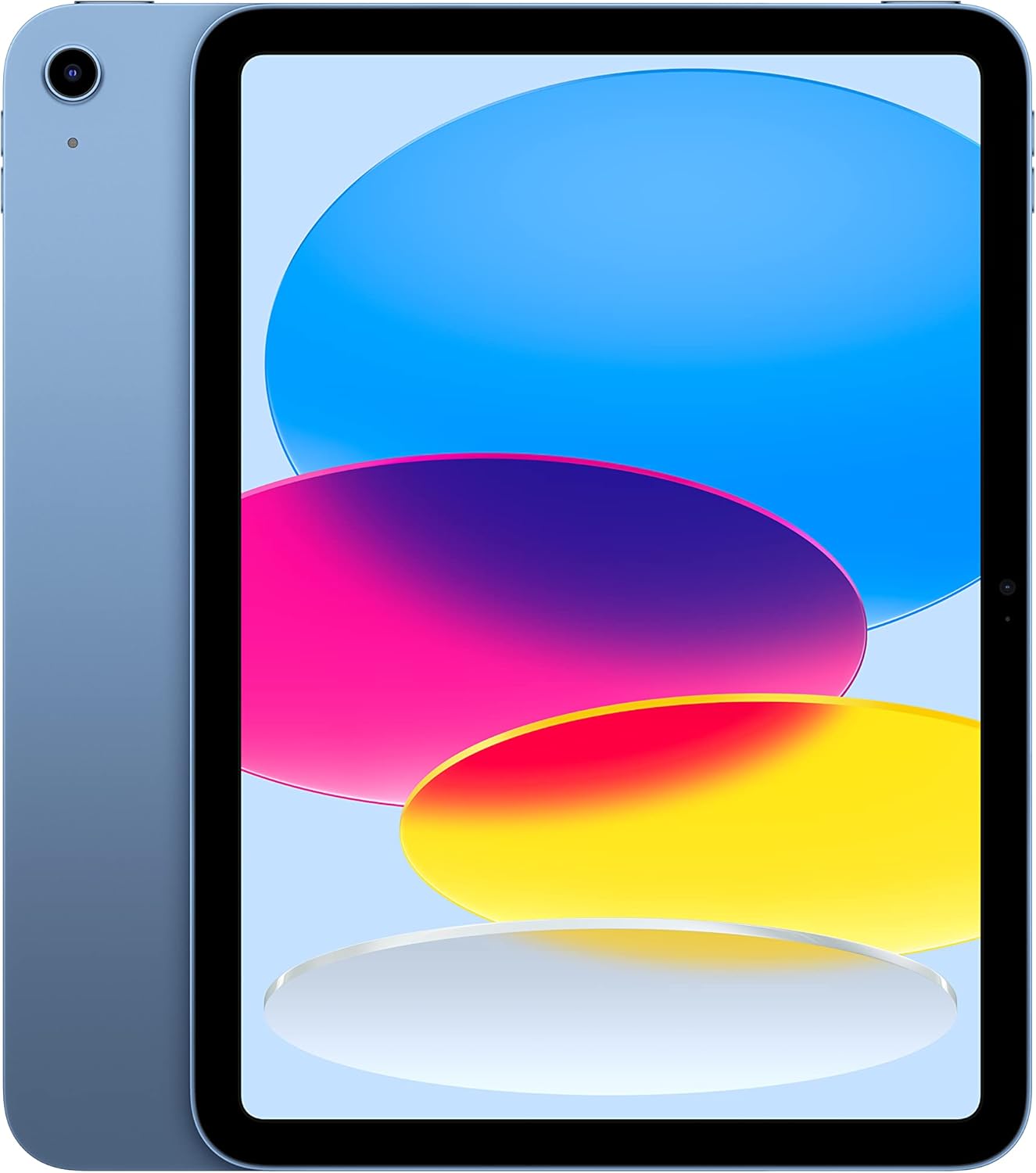
If you’ve been sworn in on an entry-level tablet, you’ll find that Apple’s latest iPad is a brilliant purchase that forwards its exciting price point for 2024. Its 10.9-inch display gives you enough screen real estate to get take care of multitasking and boosts your productivity too. You can quickly switch between different programs, take notes, or stream your favorite shows — all on a vibrant display that has a resolution of 2,360 by 1,640 pixels.
It comes with Apple iPadOS 16, so will be one of the first to get feature and software updates, making it feel smooth and responsive. At just 1.1 pounds and 9.79 by 7.07 by 0.28 inches, it’s portable enough to take with you wherever you go.
Thanks to the Apple A14 Bionic chip packed inside, this iPad performs exceptionally well for daily tasks like web browsing, gaming and productivity apps. Provides 64 GB of storage space for your data.
You should be happy with compatibility with different accessories to make for a better experience. While nearly six hours of battery life may not sound like a lot, it should be ample for average use. All in all, this iPad really is the best of balance between price and utility and is the best choice for many that want to dip a toe in the Apple ecosystem.
2. Samsung Galaxy Tab S9 FE Plus – Best Tablet for Battery Life

The Samsung Galaxy Tab S9 FE Plus should be at the top of your list if you’re in the market for a premium tablet. The sharp 12.4″ screen will produce bright, clear visuals that make streaming your favorite shows and browsing the net much more enjoyable. Whether you’re taking photography classes or binging a few seasons of your favorite show, this tablet is up to the challenge.
Another highlight worth mentioning is durability, since the Tab S9 FE Plus has an IP68 rating, so it is also resistant to dust and water. You can take it poolside or in the kitchen without worrying about those sudden spills. The immersive 10,090 mAh battery life lasting up to 20 hours, paired with Super Fast Charging, allowing you to return to activity in less than 90 minutes.
With the latest Exynos 1380 chipset, everything runs smoothly—from checking emails to watching videos. And the S Pen takes it to the next level by letting you jot down notes or create gorgeous works of art — art that flows on your phone as pen on paper does.
Although its full-fledged camera capabilities may disappoint serious photographers, its clean, light design makes it an excellent travel companion. Extremely capable with an attractive price tag, the Samsung Galaxy Tab S9 FE Plus is ideal for versatile users like you, looking to take their digital experience to the next level both in terms of work and play.
3. Apple iPad Air (6th generation) – Best Middle-of-the-Road Tablet

This perfectly described the design, performance and power of the Apple iPad Air with M2 chip. The 2-in-1 you’re looking at also comes in 11-inch and 13-inch size options, so you can pick the one that works best for your lifestyle, whether it’s for working on detailed projects, streaming media or just browsing.
While investigating the iPad Air, you’ll discover it is nicely centered between the entry-level iPad and the pricier iPad Pro in price. It has, however, successfully covered the gap in terms of performance. Apple says you’ll see up to 50% better performance than previous models, which also translates to a more noticeable boost in speed and efficiency in tasks like gaming and video editing.
The iPad Air supports the Apple Pencil Pro, which you can use to unlock your creativity and take seamless notes. You will be amazed with the 264 ppi on a 13 inches display with 2732-by-2048-pixel resolution that will make your visuals pop.
Essentially the iPad Air is giving you flagship features and top-tier software in a less expensive package than the iPad Pro. It’s a device that keeps pace with your demands, all while delivering the flexibility and ingenuity you’ve come to expect from Apple. Your next device has arrived — designed to help you work, create and connect better than ever before.
4. Samsung Galaxy Tab S9 – Best Tablet for Work

If you need to get some work done on a tablet, the Samsung Galaxy Tab S9 is purpose-built for multitasking and getting work done. Samsung’s intuitive and familiar OneUI interface makes it easier to manage multiple apps in split screen, something you no doubt learned on your other tablets, including the iPad Pro.
Think about a workspace where you can open multiple apps with a click, drag and drop an image or text between windows and keep an eye on everything in your sight without feeling overwhelmed. That is precisely what the Galaxy Tab S9 does.
All of this comes in at a lightweight 732g with dimensions of 326.4 x 208.6 x 5.5mm, so it can pack a punch without weighing you down. That said, it comes on Android 14 with enhanced OneUI 6.1. In terms of display, the stunning 14.6-inch screen features a resolution of 1848 x 2960 pixels that makes every detail shine. It is powered by the Snapdragon 8 Gen 2 for Galaxy CPU that makes everything fly.
Pick from 256GB, 512GB, or 1TB of storage, which can be expanded even further with a microSD slot. And the powerful 11,200mAh battery has you working all day without a pause. And, with dual front-facing cameras and a rear lens array composed of a 13MP wide and 8MP ultra-wide lens setup, you can easily handle video calls or capture those important moments. The Galaxy Tab S9 fundamentally changes the way you work and engage with your digital world.
5. Amazon Fire 7 – Best Budget Tablet

For anyone in the market for an inexpensive tablet, though, the Fire 7 makes a strong case. Though lacking the premium feel of more expensive models and running on Amazon’s FireOS, its wallet-friendly price makes it a clear front-runner. It weighs only 9.9 ounces and thus is portable, meaning you can easily take it with you anywhere.
Perhaps most impressive is its astonishing battery life, an almost 11-hour duration that competes with higher-end tablets like the iPad Air — at a fraction of the price. The Fire 7 also has a microSD port, which lets you add cards of up to 1TB, so you can add loads of storage without the price tag like Apple’s pricier tablets.
That said, temper your expectations. In terms of design it is quite basic, with a plastic chassis and relatively thick bezels making it look far from premium. It has a 7-inch display with a resolution of 1024 x 600 pixels, which isn’t great for HD media. The camera and speakers also aren’t as good as other tablets out there, but compromises can be made at this price point.
The Fire 7 is especially good for kids since it’s a budget entry point for the tablet arena. It features thousands of apps available through Amazon’s App Store and comes packed with great parental controls for your little ones. For the price, the Amazon Fire 7 is a no-nonsense option if you’re in need of a reliable tablet while still trying to save some cash.
Things to Consider Before Buying a Tablet:
This guide will help you navigate the important factors to assess before purchasing a tablet. With so many options available, understanding your needs and preferences is crucial for making an informed choice. From screen size and performance to battery life and operating systems, each element plays a role in your overall experience. By the end of this post, you’ll be equipped with the knowledge to select the tablet that best fits your lifestyle and requirements.
Windows Tablets
While Windows tablets offer the familiar Windows interface, they are ideal for users requiring software compatibility with traditional PC applications. These tablets generally deliver robust performance for productivity tasks, making them suitable for both work and casual use.
Android Tablets
Any Android tablet is a versatile option that allows you to access thousands of apps tailored to your interests. With a wide range of devices at different price points, you’ll find something that fits your budget and requirements.
Plus, Android tablets often come equipped with features like expandable storage and various display sizes, allowing you to personalize your experience while providing flexibility in how you use your device.
Apple iPads
Tablets from Apple, specifically the iPad line, are renowned for their premium build quality and compatibility with a broad range of apps and services. They excel in graphics performance and offer a seamless ecosystem integration for other Apple products.
The iPad also benefits from software updates that enhance functionality over time, ensuring that your device will remain relevant and efficient for years to come. Additionally, the availability of accessories like the Apple Pencil adds an extra layer of usability and productivity.
Screen Size and Resolution
Screen size and resolution greatly impact your overall user experience. Depending on how you plan to use the tablet, from reading and browsing to gaming or watching movies, you’ll want a size that feels comfortable for your activities. A higher resolution enhances clarity and visual detail, making content more enjoyable, so consider the display quality as well.
Battery Life and Performance
Battery life and performance are vital for uninterrupted usage. A tablet with longer battery life allows you to use it throughout your day without constant charging, especially if you travel or use it on the go. You should also consider the processor and RAM to ensure that it runs smoothly during multitasking or running demanding applications.
With a tablet, a balance between battery performance and overall power can greatly enhance your productivity or entertainment experience. Opt for models that offer robust battery management features, so you can enjoy longer usage times. Efficient processors can also extend battery life while ensuring responsive operation, making these aspects key to your decision-making process.
Storage Options
One of the significant decisions you need to make is regarding storage options. Depending on how you intend to use the tablet, you may require more or less storage. Streaming media could mean less need for internal space, while extensive app usage or local file storage might necessitate a model with higher capacity or expandable memory.
Understanding your storage needs is vital for choosing the right tablet. Look for options that provide a range of storage capacities and the flexibility of expandable memory through microSD cards, as this can save you from running out of space unexpectedly. It’s important to gauge how much content you will store locally versus relying on cloud services, as this impacts your purchase decision significantly.
Assessing Your Needs
Any successful tablet purchase begins with a clear understanding of your requirements. Think about what you intend to use the tablet for, whether it’s for work, streaming, gaming, or casual browsing. By identifying your primary use case, you can narrow down your options to tablets designed to excel in those areas.
Budgeting Effectively
Effectively managing your budget can ensure that you get the best possible tablet for your needs without overspending. Factor in not just the initial purchase price, but also potential accessories, apps, and future upgrades.
Budgeting is key to a satisfying purchase experience. Assess your financial situation and set a reasonable budget range for your tablet. Look for sales and promotions that fit within this budget while also considering the long-term value of your investment. A higher-priced tablet may offer better longevity and performance, potentially saving you money in the long run. Prioritize features that matter most to you to maximize your budget’s effectiveness.
Common Queries on Tablet Usage
For many users, the biggest questions revolve around battery life, storage capacity, and compatibility with apps or accessories. Understanding these factors can significantly enhance your user experience and ensure your tablet meets your requirements.
Expert Recommendations
Frequently, experts suggest considering your primary usage before buying a tablet. Whether for gaming, professional work, or casual browsing, specific features will enhance your experience. Assessing specifications like processor speed, display quality, and app support can guide you in making an informed choice.
Usage scenarios tend to dictate expert advice strongly. If you plan to use your tablet for graphic-intensive tasks, look for models with robust processors and high-resolution displays. Conversely, for basic web browsing and document reading, a budget-friendly option may suffice. By aligning your expectations with expert insights, you can select a tablet that not only fits your current needs but also adapts as those needs evolve.
Final Words
Summing up, before making a tablet purchase, you should evaluate your specific needs, whether they involve gaming, productivity, or media consumption. Consider the operating system that aligns with your usage habits, the processing power that supports your applications, and the battery life that meets your on-the-go lifestyle. Additionally, look into the tablet’s display quality and storage options to ensure a satisfying user experience. By carefully weighing these factors, you can find a tablet that perfectly complements your daily routine and enhances your productivity.
Leave a Reply